


Behavioral economic demand is gaining in popularity. The motivation
behind beezdemand was to create an alternative tool to
conduct these analyses. It is meant for researchers to conduct
behavioral economic (be) demand the easy (ez) way.
Currently, this version is stable. I encourage you to use it but be aware that, as with any software release, there might be (unknown) bugs present. I’ve tried hard to make this version usable while including the core functionality (described more below). However, if you find issues or would like to contribute, please open an issue on my GitHub page or email me.
| Your Situation | Recommended Approach | Learn More |
|---|---|---|
| Single purchase task, individual fits | fit_demand_fixed() |
Fixed demand |
| Need group comparisons, random effects | fit_demand_mixed() |
Mixed demand |
| Many zeros, two-part modeling needed | fit_demand_hurdle() |
Hurdle models |
| Cross-commodity substitution | fit_cp_*() functions |
Cross-price models |
For detailed guidance on choosing the right modeling approach, see
the model
selection guide or vignette("model-selection"). Full
documentation is available at the pkgdown site.
The latest stable version of beezdemand can be found on
CRAN and
installed using the following command. The first time you install the
package, you may be asked to select a CRAN mirror. Simply select the
mirror geographically closest to you.
install.packages("beezdemand")

library(beezdemand)To install a stable release directly from GitHub, first
install and load the devtools package. Then, use
install_github to install the package and associated
vignette. You don’t need to download anything directly from GitHub, as you
should use the following instructions:
install.packages("devtools")

devtools::install_github("brentkaplan/beezdemand", build_vignettes = TRUE)

library(beezdemand)An example dataset of responses on an Alcohol Purchase Task is
provided. This object is called apt and is located within
the beezdemand package. These data are a subset of from the
paper by Kaplan & Reed (2018). Participants (id) reported the number
of alcoholic drinks (y) they would be willing to purchase and consume at
various prices (x; USD). Note the format of the data, which is called
“long format”. Long format data are data structured such that repeated
observations are stacked in multiple rows, rather than across columns.
First, take a look at an extract of the dataset apt, where
I’ve subsetted rows 1 through 10 and 17 through 26:
| id | x | y | |
|---|---|---|---|
| 1 | 19 | 0.0 | 10 |
| 2 | 19 | 0.5 | 10 |
| 3 | 19 | 1.0 | 10 |
| 4 | 19 | 1.5 | 8 |
| 5 | 19 | 2.0 | 8 |
| 6 | 19 | 2.5 | 8 |
| 7 | 19 | 3.0 | 7 |
| 8 | 19 | 4.0 | 7 |
| 9 | 19 | 5.0 | 7 |
| 10 | 19 | 6.0 | 6 |
| 17 | 30 | 0.0 | 3 |
| 18 | 30 | 0.5 | 3 |
| 19 | 30 | 1.0 | 3 |
| 20 | 30 | 1.5 | 3 |
| 21 | 30 | 2.0 | 2 |
| 22 | 30 | 2.5 | 2 |
| 23 | 30 | 3.0 | 2 |
| 24 | 30 | 4.0 | 2 |
| 25 | 30 | 5.0 | 2 |
| 26 | 30 | 6.0 | 2 |
The first column contains the row number. The second column contains the id number of the series within the dataset. The third column contains the x values (in this specific dataset, price per drink) and the fourth column contains the associated responses (number of alcoholic drinks purchased at each respective price). There are replicates of id because for each series (or participant), several x values were presented.
For quick conversion, use the built-in convenience function:
long <- pivot_demand_data(wide, format = "long", id_var = "id")Below is a manual walkthrough using tidyr for when you
need more control.
Take for example the format of most datasets that would be exported from a data collection software such as Qualtrics or SurveyMonkey or Google Forms:
## the following code takes the apt data, which are in long format, and converts
## to a wide format that might be seen from data collection software
wide <- tidyr::pivot_wider(apt, names_from = x, values_from = y)
colnames(wide) <- c("id", paste0("price_", seq(1, 16, by = 1)))
knitr::kable(wide[1:5, 1:10])| id | price_1 | price_2 | price_3 | price_4 | price_5 | price_6 | price_7 | price_8 | price_9 |
|---|---|---|---|---|---|---|---|---|---|
| 19 | 10 | 10 | 10 | 8 | 8 | 8 | 7 | 7 | 7 |
| 30 | 3 | 3 | 3 | 3 | 2 | 2 | 2 | 2 | 2 |
| 38 | 4 | 4 | 4 | 4 | 4 | 4 | 4 | 3 | 3 |
| 60 | 10 | 10 | 8 | 8 | 6 | 6 | 5 | 5 | 4 |
| 68 | 10 | 10 | 9 | 9 | 8 | 8 | 7 | 6 | 5 |
A dataset such as this is referred to as “wide format” because each
participant series contains a single row and multiple measurements
within the participant are indicated by the columns. This data format is
fine for some purposes; however, for beezdemand, data are
required to be in “long format” (in the same format as the example data
described earlier). In order to convert to the
long format, some steps will be required.
First, it is helpful to rename the columns to what the prices actually were. For example, for the purposes of our example dataset, price_1 was $0.00 (free), price_2 was $0.50, price_3 was $1.00, and so on.
## make an object to hold what will be the new column names
newcolnames <- c("id", "0", "0.5", "1", "1.50", "2", "2.50", "3",
                 "4", "5", "6", "7", "8", "9", "10", "15", "20")
## current column names
colnames(wide)
[1] "id" "price_1" "price_2" "price_3" "price_4" "price_5"
[7] "price_6" "price_7" "price_8" "price_9" "price_10" "price_11"
[13] "price_12" "price_13" "price_14" "price_15" "price_16"## replace current column names with new column names
colnames(wide) <- newcolnames
## how new data look (first 5 rows only)
knitr::kable(wide[1:5, ])| id | 0 | 0.5 | 1 | 1.50 | 2 | 2.50 | 3 | 4 | 5 | 6 | 7 | 8 | 9 | 10 | 15 | 20 |
|---|---|---|---|---|---|---|---|---|---|---|---|---|---|---|---|---|
| 19 | 10 | 10 | 10 | 8 | 8 | 8 | 7 | 7 | 7 | 6 | 6 | 5 | 5 | 4 | 3 | 2 |
| 30 | 3 | 3 | 3 | 3 | 2 | 2 | 2 | 2 | 2 | 2 | 2 | 2 | 1 | 1 | 1 | 1 |
| 38 | 4 | 4 | 4 | 4 | 4 | 4 | 4 | 3 | 3 | 3 | 3 | 2 | 2 | 2 | 0 | 0 |
| 60 | 10 | 10 | 8 | 8 | 6 | 6 | 5 | 5 | 4 | 4 | 3 | 3 | 2 | 2 | 0 | 0 |
| 68 | 10 | 10 | 9 | 9 | 8 | 8 | 7 | 6 | 5 | 5 | 5 | 4 | 4 | 3 | 0 | 0 |
Now we can convert into a long format using some of the helpful
functions in the tidyverse package (make sure the package
is loaded before trying the commands below).
## using the dataframe 'wide', we specify the key will be 'price', the values
## will be 'consumption', and we will select all columns besides the first ('id')
long <- tidyr::pivot_longer(wide, -id, names_to = "price", values_to = "consumption")

## we'll sort the rows by id
long <- arrange(long, id)

## view the first 20 rows
knitr::kable(long[1:20, ])| id | price | consumption |
|---|---|---|
| 19 | 0 | 10 |
| 19 | 0.5 | 10 |
| 19 | 1 | 10 |
| 19 | 1.50 | 8 |
| 19 | 2 | 8 |
| 19 | 2.50 | 8 |
| 19 | 3 | 7 |
| 19 | 4 | 7 |
| 19 | 5 | 7 |
| 19 | 6 | 6 |
| 19 | 7 | 6 |
| 19 | 8 | 5 |
| 19 | 9 | 5 |
| 19 | 10 | 4 |
| 19 | 15 | 3 |
| 19 | 20 | 2 |
| 30 | 0 | 3 |
| 30 | 0.5 | 3 |
| 30 | 1 | 3 |
| 30 | 1.50 | 3 |
Two final modifications we will make will be to (1) rename our
columns to what the functions in beezdemand will expect to
see: id, x, and y, and (2) ensure
both x and y are in numeric format.
colnames(long) <- c("id", "x", "y")

long$x <- as.numeric(long$x)
long$y <- as.numeric(long$y)
knitr::kable(head(long))| id | x | y |
|---|---|---|
| 19 | 0.0 | 10 |
| 19 | 0.5 | 10 |
| 19 | 1.0 | 10 |
| 19 | 1.5 | 8 |
| 19 | 2.0 | 8 |
| 19 | 2.5 | 8 |
The dataset is now “tidy” because: (1) each variable forms a column, (2) each observation forms a row, and (3) each type of observational unit forms a table (in this case, our observational unit is the Alcohol Purchase Task data). To learn more about the benefits of tidy data, readers are encouraged to consult Hadley Wikham’s essay on Tidy Data.
Descriptive statistics at each price (mean, SD, proportion of zeros,
min, max) are available via get_descriptive_summary():
desc <- get_descriptive_summary(apt)
desc
Descriptive Summary of Demand Data
===================================
Call:
get_descriptive_summary(data = apt)
Data Summary:
Subjects: 10
Prices analyzed: 16
Statistics by Price:
Price Mean Median SD PropZeros NAs Min Max
0 6.8 6.5 2.62 0.0 0 3 10
0.5 6.8 6.5 2.62 0.0 0 3 10
1 6.5 6.5 2.27 0.0 0 3 10
1.5 6.1 6.0 1.91 0.0 0 3 9
2 5.3 5.5 1.89 0.0 0 2 8
2.5 5.2 5.0 1.87 0.0 0 2 8
3 4.8 5.0 1.48 0.0 0 2 7
4 4.3 4.5 1.57 0.0 0 2 7
5 3.9 3.5 1.45 0.0 0 2 7
6 3.5 3.0 1.43 0.0 0 2 6
7 3.3 3.0 1.34 0.0 0 2 6
8 2.6 2.5 1.51 0.1 0 0 5
9 2.4 2.0 1.58 0.1 0 0 5
10 2.2 2.0 1.32 0.1 0 0 4
15 1.1 0.5 1.37 0.5 0 0 3
20 0.8 0.0 1.14 0.6 0 0 3| Price | Mean | Median | SD | PropZeros | NAs | Min | Max |
|---|---|---|---|---|---|---|---|
| 0 | 6.8 | 6.5 | 2.62 | 0.0 | 0 | 3 | 10 |
| 0.5 | 6.8 | 6.5 | 2.62 | 0.0 | 0 | 3 | 10 |
| 1 | 6.5 | 6.5 | 2.27 | 0.0 | 0 | 3 | 10 |
| 1.5 | 6.1 | 6.0 | 1.91 | 0.0 | 0 | 3 | 9 |
| 2 | 5.3 | 5.5 | 1.89 | 0.0 | 0 | 2 | 8 |
| 2.5 | 5.2 | 5.0 | 1.87 | 0.0 | 0 | 2 | 8 |
| 3 | 4.8 | 5.0 | 1.48 | 0.0 | 0 | 2 | 7 |
| 4 | 4.3 | 4.5 | 1.57 | 0.0 | 0 | 2 | 7 |
| 5 | 3.9 | 3.5 | 1.45 | 0.0 | 0 | 2 | 7 |
| 6 | 3.5 | 3.0 | 1.43 | 0.0 | 0 | 2 | 6 |
| 7 | 3.3 | 3.0 | 1.34 | 0.0 | 0 | 2 | 6 |
| 8 | 2.6 | 2.5 | 1.51 | 0.1 | 0 | 0 | 5 |
| 9 | 2.4 | 2.0 | 1.58 | 0.1 | 0 | 0 | 5 |
| 10 | 2.2 | 2.0 | 1.32 | 0.1 | 0 | 0 | 4 |
| 15 | 1.1 | 0.5 | 1.37 | 0.5 | 0 | 0 | 3 |
| 20 | 0.8 | 0.0 | 1.14 | 0.6 | 0 | 0 | 3 |
A box-and-whisker plot is built in:
plot(desc)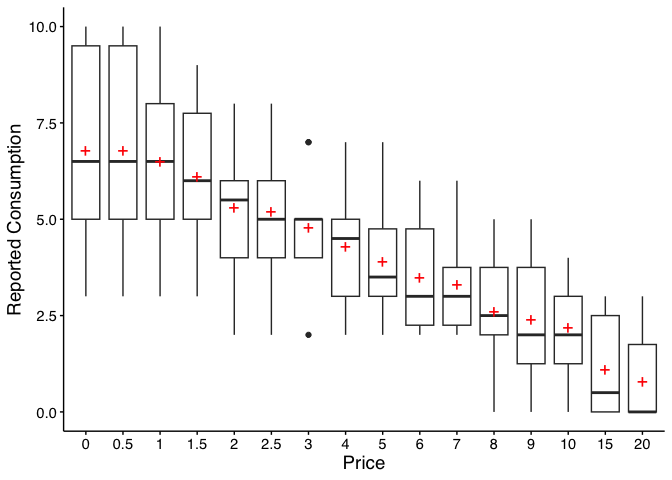
Legacy equivalent:
GetDescriptives(dat = apt, bwplot = TRUE). Seevignette("migration-guide")for details.
There are certain instances in which data are to be modified before fitting, for example when using an equation that logarithmically transforms y values. The following function can help with modifying data:
nrepl indicates number of replacement 0 values,
either as an integer or "all". If this value is an integer,
n, then the first n 0s will be
replaced.
replnum indicates the number that should replace 0
values
rem0 removes all zeros
remq0e removes y value where x (or price) equals
0
replfree replaces where x (or price) equals 0 with a
specified number
ChangeData(dat = apt, nrepl = 1, replnum = 0.01, rem0 = FALSE, remq0e = FALSE,
replfree = NULL)Stein et al.’s (2015) algorithm for identifying unsystematic
responses is available via check_systematic_demand():
sys_check <- check_systematic_demand(apt)
sys_check
Systematicity Check (demand)
------------------------------
Total patterns: 10
Systematic: 10 ( 100 %)
Unsystematic: 0 ( 0 %)
Use summary() for details, tidy() for per-subject results.summary(sys_check)Systematicity Check Summary (demand)
==================================================
Total patterns: 10
Systematic: 10 ( 100 %)
Unsystematic: 0 ( 0 %)
Failures by Criterion:
# A tibble: 4 × 3
criterion n_fail pct_fail
<chr> <int> <dbl>
1 trend 0 0
2 bounce 0 0
3 reversals 0 0
4 overall 0 0Legacy equivalent:
CheckUnsystematic(dat = apt, deltaq = 0.025, bounce = 0.1, reversals = 0, ncons0 = 2). Seevignette("migration-guide")for details.
Empirical measures (intensity, breakpoint, Omax, Pmax) can be
obtained via get_empirical_measures():
emp <- get_empirical_measures(apt)
emp
Empirical Demand Measures
=========================
Call:
get_empirical_measures(data = apt)
Data Summary:
Subjects: 10
Subjects with zero consumption: Yes
Complete cases (no NAs): 6
Empirical Measures:
id Intensity BP0 BP1 Omaxe Pmaxe
19 10 NA 20 45 15
30 3 NA 20 20 20
38 4 15 10 21 7
60 10 15 10 24 8
68 10 15 10 36 9
106 5 8 7 15 5
113 6 NA 20 45 15
142 8 NA 20 60 20
156 7 20 15 21 7
188 5 15 10 15 5| id | Intensity | BP0 | BP1 | Omaxe | Pmaxe |
|---|---|---|---|---|---|
| 19 | 10 | NA | 20 | 45 | 15 |
| 30 | 3 | NA | 20 | 20 | 20 |
| 38 | 4 | 15 | 10 | 21 | 7 |
| 60 | 10 | 15 | 10 | 24 | 8 |
| 68 | 10 | 15 | 10 | 36 | 9 |
Legacy equivalent:
GetEmpirical(dat = apt). Seevignette("migration-guide")for details.
The recommended function for fitting individual demand curves is
fit_demand_fixed(). It provides a modern S3 interface with
summary(), coef(), tidy(),
glance(), predict(), and plot()
methods.
Key arguments:
equation — "hs" (Hursh & Silberberg,
2008; default) or "koff" (Koffarnus et al., 2015).k — scaling constant. By default, calculated from the
sample range + 0.5. Other options: "ind" (individual),
"fit" (free parameter), "share" (shared across
all series).agg — NULL (individual fits; default),
"Mean" (fit to averaged data), or "Pooled"
(fit to all data ignoring clustering).fit_hs <- fit_demand_fixed(apt, equation = "hs")
fit_hsFixed-Effect Demand Model
==========================
Call:
fit_demand_fixed(data = apt, equation = "hs")
Equation: hs
k: fixed (2)
Subjects: 10 ( 10 converged, 0 failed)
Use summary() for parameter summaries, tidy() for tidy output.Extract coefficients and tidy output:
head(coef(fit_hs))# A tibble: 6 × 5
id term estimate estimate_scale term_display
<chr> <chr> <dbl> <chr> <chr>
1 19 q0 10.2 natural q0
2 19 alpha 0.00205 natural alpha
3 30 q0 2.81 natural q0
4 30 alpha 0.00587 natural alpha
5 38 q0 4.50 natural q0
6 38 alpha 0.00420 natural alpha | id | term | estimate | std.error | statistic | p.value | component | estimate_scale | term_display | estimate_internal |
|---|---|---|---|---|---|---|---|---|---|
| 19 | Q0 | 10.158665 | 0.2685323 | NA | NA | fixed | natural | Q0 | 10.158665 |
| 30 | Q0 | 2.807366 | 0.2257764 | NA | NA | fixed | natural | Q0 | 2.807366 |
| 38 | Q0 | 4.497456 | 0.2146862 | NA | NA | fixed | natural | Q0 | 4.497456 |
| 60 | Q0 | 9.924274 | 0.4591683 | NA | NA | fixed | natural | Q0 | 9.924274 |
| 68 | Q0 | 10.390384 | 0.3290277 | NA | NA | fixed | natural | Q0 | 10.390384 |
| 106 | Q0 | 5.683566 | 0.3002817 | NA | NA | fixed | natural | Q0 | 5.683566 |
| 113 | Q0 | 6.195949 | 0.1744096 | NA | NA | fixed | natural | Q0 | 6.195949 |
| 142 | Q0 | 6.171990 | 0.6408575 | NA | NA | fixed | natural | Q0 | 6.171990 |
| 156 | Q0 | 8.348973 | 0.4105617 | NA | NA | fixed | natural | Q0 | 8.348973 |
| 188 | Q0 | 6.303639 | 0.5636959 | NA | NA | fixed | natural | Q0 | 6.303639 |
fit_koff <- fit_demand_fixed(apt, equation = "koff")
fit_koff
Fixed-Effect Demand Model
==========================
Call:
fit_demand_fixed(data = apt, equation = "koff")
Equation: koff
k: fixed (2)
Subjects: 10 ( 10 converged, 0 failed)
Use summary() for parameter summaries, tidy() for tidy output.fit_mean <- fit_demand_fixed(apt, equation = "hs", agg = "Mean")
fit_meanFixed-Effect Demand Model
==========================
Call:
fit_demand_fixed(data = apt, equation = "hs", agg = "Mean")
Equation: hs
k: fixed (2)
Aggregation: Mean
Subjects: 1 ( 1 converged, 0 failed)
Use summary() for parameter summaries, tidy() for tidy output.fit_share <- fit_demand_fixed(apt, equation = "hs", k = "share")Beginning search for best-starting k
Best k found at 0.93813356574003 = err: 0.744881846162718
Searching for shared K, this can take a while...fit_shareFixed-Effect Demand Model
==========================
Call:
fit_demand_fixed(data = apt, equation = "hs", k = "share")
Equation: hs
k: share
Subjects: 10 ( 10 converged, 0 failed)
Use summary() for parameter summaries, tidy() for tidy output.All fit_demand_fixed() results support
plot():
plot(fit_hs, type = "individual", x_trans = "log10")Free is shown as `0.01` for purposes of plotting.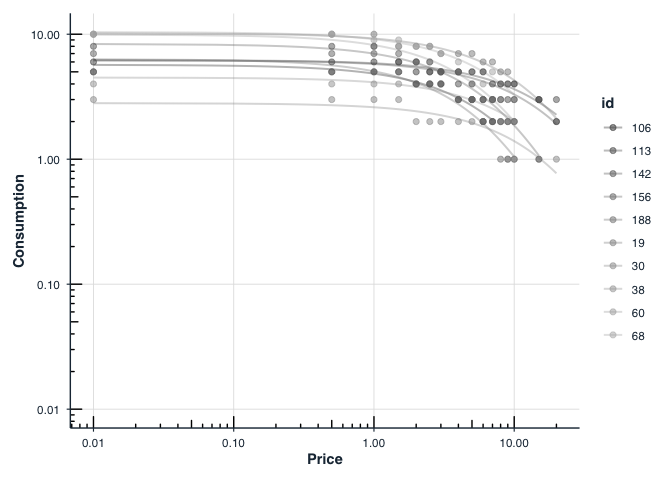
plot(fit_mean, x_trans = "log10")Free is shown as `0.01` for purposes of plotting.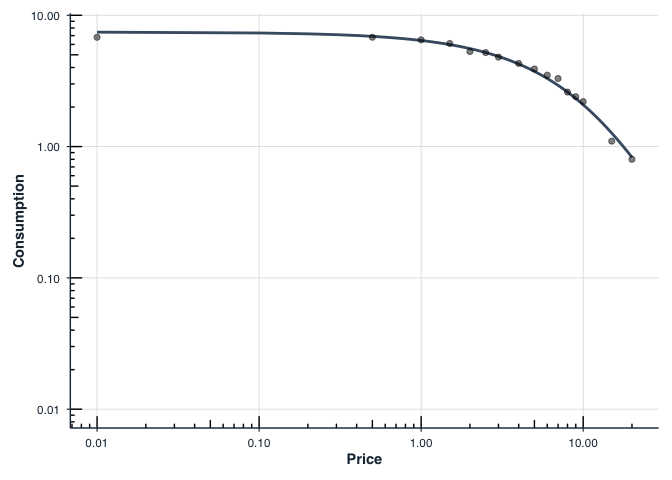
Legacy equivalent: The
FitCurves()+PlotCurves()workflow is still available for backward compatibility. Seevignette("migration-guide")for transitioning fromFitCurves()tofit_demand_fixed().
For mixed-effects group comparisons, consider
fit_demand_mixed()with group factors. Seevignette("group-comparisons").
When one has multiple groups, it may be beneficial to compare whether
separate curves are preferred over a single curve. This is accomplished
by the Extra Sum-of-Squares F-test. This function (using the
argument compare) will determine whether a single \(\alpha\) or a single \(Q_0\) is better than multiple \(\alpha\)s or \(Q_0\)s. A single curve will be fit, the
residual deviations calculated and those residuals are compared to
residuals obtained from multiple curves. A resulting F
statistic will be reporting along with a p value.
## setting the seed initializes the random number generator so results will be
## reproducible
set.seed(1234)

## manufacture random grouping
apt$group <- NA
apt[apt$id %in% sample(unique(apt$id), length(unique(apt$id))/2), "group"] <- "a"
apt$group[is.na(apt$group)] <- "b"

## take a look at what the new groupings look like in long form
knitr::kable(apt[1:20, ])| id | x | y | group |
|---|---|---|---|
| 19 | 0.0 | 10 | a |
| 19 | 0.5 | 10 | a |
| 19 | 1.0 | 10 | a |
| 19 | 1.5 | 8 | a |
| 19 | 2.0 | 8 | a |
| 19 | 2.5 | 8 | a |
| 19 | 3.0 | 7 | a |
| 19 | 4.0 | 7 | a |
| 19 | 5.0 | 7 | a |
| 19 | 6.0 | 6 | a |
| 19 | 7.0 | 6 | a |
| 19 | 8.0 | 5 | a |
| 19 | 9.0 | 5 | a |
| 19 | 10.0 | 4 | a |
| 19 | 15.0 | 3 | a |
| 19 | 20.0 | 2 | a |
| 30 | 0.0 | 3 | b |
| 30 | 0.5 | 3 | b |
| 30 | 1.0 | 3 | b |
| 30 | 1.5 | 3 | b |
## in order for this to run, you will have had to run the code immediately
## preceeding (i.e., the code to generate the groups)
ef <- ExtraF(dat = apt, equation = "koff", k = 2, groupcol = "group", verbose = TRUE)
Null hypothesis: alpha same for all data sets
Alternative hypothesis: alpha different for each data set
Conclusion: fail to reject the null hypothesis
F(1,156) = 0.0298, p = 0.8631A summary table (broken up here for ease of display) will be created
when the option verbose = TRUE. This table can be accessed
as the dfres object resulting from ExtraF. In
the example above, we can access this summary table using
ef$dfres:
| Group | Q0d | K | R2 | Alpha |
|---|---|---|---|---|
| Shared | NA | NA | NA | NA |
| a | 8.489634 | 2 | 0.6206444 | 0.0040198 |
| b | 5.848119 | 2 | 0.6206444 | 0.0040198 |
| Not Shared | NA | NA | NA | NA |
| a | 8.503442 | 2 | 0.6448801 | 0.0040518 |
| b | 5.822075 | 2 | 0.5242825 | 0.0039376 |
Fitted Measures
| Group | N | AbsSS | SdRes |
|---|---|---|---|
| Shared | NA | NA | NA |
| a | 160 | 387.0945 | 1.570213 |
| b | 160 | 387.0945 | 1.570213 |
| Not Shared | NA | NA | NA |
| a | 80 | 249.2764 | 1.787695 |
| b | 80 | 137.7440 | 1.328890 |
Uncertainty and Model Information
| Group | EV | Omaxd | Pmaxd |
|---|---|---|---|
| Shared | NA | NA | NA |
| a | 0.8795301 | 22.63159 | 8.453799 |
| b | 0.8795301 | 22.63159 | 12.272265 |
| Not Shared | NA | NA | NA |
| a | 0.8725741 | 22.45260 | 8.373320 |
| b | 0.8978945 | 23.10414 | 12.584550 |
Derived Measures
| Group | Omaxa | Notes |
|---|---|---|
| Shared | NA | NA |
| a | 22.63190 | converged |
| b | 22.63190 | converged |
| Not Shared | NA | NA |
| a | 22.45291 | converged |
| b | 23.10445 | converged |
Convergence and Summary Information
When verbose = TRUE, objects from the result can be used
in subsequent graphing. The following code generates a plot of our two
groups. We can use the predicted values already generated from the
ExtraF function by accessing the newdat
object. In the example above, we can access these predicted values using
ef$newdat. Note that we keep the linear scaling of y given
we used Koffarnus et al. (2015)’s equation fitted to the data.
## be sure that you've loaded the tidyverse package (e.g., library(tidyverse))
ggplot(apt, aes(x = x, y = y, group = group)) +
  ## the predicted lines from the sum of squares f-test can be used in subsequent
  ## plots by calling data = ef$newdat
  geom_line(aes(x = x, y = y, group = group, color = group),
            data = ef$newdat[ef$newdat$x >= .1, ]) +
  stat_summary(fun.data = "mean_se", aes(color = group),
               geom = "errorbar", orientation = "x", width = 0) +
  stat_summary(fun = "mean", aes(fill = group), geom = "point", shape = 21,
               color = "black", stroke = .75, size = 4, orientation = "x") +
  scale_x_continuous(limits = c(.4, 50), breaks = c(.1, 1, 10, 100)) +
  coord_trans(x = "log10") +
  scale_color_discrete(name = "Group") +
  scale_fill_discrete(name = "Group") +
  labs(x = "Price per Drink", y = "Drinks Purchased") +
  theme(legend.position = c(.85, .75)) +
  ## theme_apa is a beezdemand function used to change the theme in accordance
  ## with American Psychological Association style
  theme_apa()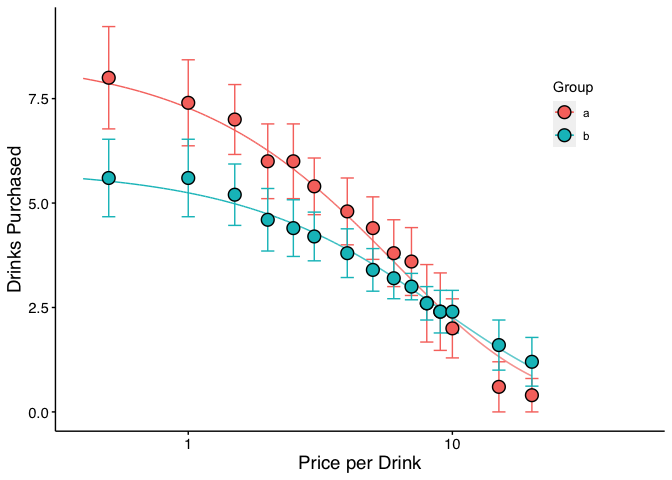
In addition to classic purchase-task analyses,
beezdemand now includes functions for cross-price demand
modeling. These tools help you check for unsystematic data, fit
nonlinear or linear/mixed-effects cross-price models, and visualize the
results.
Key functions:
check_unsystematic_cp() — identify unsystematic
cross-price patterns.fit_cp_nls() — fit nonlinear cross-price models (e.g.,
exponentiated form).fit_cp_linear() — fit linear and mixed-effects
cross-price models.summary(), plot(),
glance(), tidy().Minimal example (using the included ETM dataset):
library(dplyr)
data(etm, package = "beezdemand")

# Focus on one product/id and check for unsystematic responding
ex <- etm |> filter(group %in% "E-Cigarettes", id %in% 1)
check_unsystematic_cp(ex)

# Nonlinear cross-price model (exponentiated form)
fit_nls <- fit_cp_nls(ex, equation = "exponentiated", return_all = TRUE)
summary(fit_nls)
plot(fit_nls, x_trans = "log10")
Linear mixed-effects cross-price model across all participants:
fit_mixed <- fit_cp_linear(
  etm,
  type = "mixed",
  log10x = TRUE,
  group_effects = "interaction",
  return_all = TRUE
)
summary(fit_mixed)
plot(fit_mixed, x_trans = "log10", pred_type = "all")
See the vignette “How to Use Cross-Price Demand Model Functions” for a full walkthrough of data structure, modeling options, visualization, and post-hoc comparisons.
beezdemand also supports nonlinear mixed-effects demand
models to estimate subject-level parameters (e.g., Q0 and alpha) while
modeling fixed effects of conditions (e.g., dose, drug). The
zben equation form pairs well with the included LL4
transformation to handle zeros and wide dynamic ranges.
Key functions:
fit_demand_mixed() — fit mixed-effects demand models
via nlme.ll4() / ll4_inv() — transform and
inverse-transform consumption.plot()/predict() on
beezdemand_nlme objects.get_demand_param_emms() and
comparisons using get_demand_comparisons().Minimal example (using the included nonhuman dataset
ko):
library(dplyr)
data(ko, package = "beezdemand")

# Fit zben form on LL4-transformed consumption with two factors
fit_nlme <- fit_demand_mixed(
  data = ko,
  y_var = "y_ll4",
  x_var = "x",
  id_var = "monkey",
  factors = c("drug", "dose"),
  equation_form = "zben"
)
print(fit_nlme)

# Plot on the natural (back-transformed) scale
plot(
  fit_nlme,
  inv_fun = ll4_inv,
  x_trans = "pseudo_log",
  y_trans = "pseudo_log"
)
For more details, see the “Mixed-Effects Demand Modeling with
beezdemand” vignette, which covers starting values,
fixed/random effects, and post-hoc analyses of parameter estimates.
To learn more about a function and what arguments it takes, type “?” in front of the function name.
## Modern interface (recommended)
?fit_demand_fixed
?get_empirical_measures
?get_descriptive_summary
?check_systematic_demand

## Legacy interface (still available)
?FitCurves
?CheckUnsystematicShawn P. Gilroy, Contributor GitHub
Derek D. Reed, Applied Behavioral Economics Laboratory
Mikhail N. Koffarnus, Addiction Recovery Research Center
Steven R. Hursh, Institutes for Behavior Resources, Inc.
Paul E. Johnson, Center for Research Methods and Data Analysis, University of Kansas
Peter G. Roma, Institutes for Behavior Resources, Inc.
W. Brady DeHart, Addiction Recovery Research Center
Michael Amlung, Cognitive Neuroscience of Addictions Laboratory
Special thanks to the following people who helped provide feedback on this document:
Alexandra M. Mellis
Mr. Jeremiah “Downtown Jimbo Brown” Brown
Gideon Naudé
The package publishes machine-readable documentation for use with AI coding assistants and RAG systems:
llms.txt — canonical entry point for
LLMs, published at: https://brentkaplan.github.io/beezdemand/llms.txtcontext7.json at the repo
root configures Context7 indexing. Use
/brentkaplan/beezdemand as the library ID in
Context7-enabled tools.inst/llm/docs-map.md
summarises workflows, data format, and key functions for RAG
ingestion.Reed, D. D., Niileksela, C. R., & Kaplan, B. A. (2013). Behavioral economics: A tutorial for behavior analysts in practice. Behavior Analysis in Practice, 6 (1), 34–54. https://doi.org/10.1007/BF03391790
Reed, D. D., Kaplan, B. A., & Becirevic, A. (2015). Basic research on the behavioral economics of reinforcer value. In Autism Service Delivery (pp. 279-306). Springer New York. https://doi.org/10.1007/978-1-4939-2656-5_10
Hursh, S. R., & Silberberg, A. (2008). Economic demand and essential value. Psychological Review, 115 (1), 186-198. https://doi.org/10.1037/0033-295X.115.1.186
Koffarnus, M. N., Franck, C. T., Stein, J. S., & Bickel, W. K. (2015). A modified exponential behavioral economic demand model to better describe consumption data. Experimental and Clinical Psychopharmacology, 23 (6), 504-512. https://doi.org/10.1037/pha0000045
Stein, J. S., Koffarnus, M. N., Snider, S. E., Quisenberry, A. J., & Bickel, W. K. (2015). Identification and management of nonsystematic purchase task data: Toward best practice. Experimental and Clinical Psychopharmacology 23 (5), 377-386. https://doi.org/10.1037/pha0000020
Hursh, S. R., Raslear, T. G., Shurtleff, D., Bauman, R., & Simmons, L. (1988). A cost‐benefit analysis of demand for food. Journal of the Experimental Analysis of Behavior, 50 (3), 419-440. https://doi.org/10.1901/jeab.1988.50-419
Kaplan, B. A., Franck, C. T., McKee, K., Gilroy, S. P., & Koffarnus, M. N. (2021). Applying mixed-effects modeling to behavioral economic demand: An introduction. Perspectives on Behavior Science, 44 (2), 333–358. https://doi.org/10.1007/s40614-021-00299-7
Koffarnus, M. N., Kaplan, B. A., Franck, C. T., Rzeszutek, M. J., & Traxler, H. K. (2022). Behavioral economic demand modeling chronology, complexities, and considerations: Much ado about zeros. Behavioural Processes, 199, 104646. https://doi.org/10.1016/j.beproc.2022.104646
Reed, D. D., Kaplan, B. A., & Gilroy, S. P. (2025). Handbook of Operant Behavioral Economics: Demand, Discounting, Methods, and Applications (1st ed.). Academic Press. https://shop.elsevier.com/books/handbook-of-operant-behavioral-economics/reed/978-0-323-95745-8
Kaplan, B. A. (2025). Quantitative models of operant demand. In D. D. Reed, B. A. Kaplan, & S. P. Gilroy (Eds.), Handbook of Operant Behavioral Economics: Demand, Discounting, Methods, and Applications (1st ed.). Academic Press. https://shop.elsevier.com/books/handbook-of-operant-behavioral-economics/reed/978-0-323-95745-8
Kaplan, B. A., & Reed, D. D. (2025). shinybeez: A Shiny app for behavioral economic easy demand and discounting. Journal of the Experimental Analysis of Behavior. https://doi.org/10.1002/jeab.70000
Rzeszutek, M. J., Regnier, S. D., Franck, C. T., & Koffarnus, M. N. (2025). Overviewing the exponential model of demand and introducing a simplification that solves issues of span, scale, and zeros. Experimental and Clinical Psychopharmacology.
Rzeszutek, M. J., Regnier, S. D., Kaplan, B. A., Traxler, H. K., Stein, J. S., Tomlinson, D., & Koffarnus, M. N. (2025). Identification and management of nonsystematic cross-commodity data: Toward best practice. Experimental and Clinical Psychopharmacology. In press.
