| Title: | In-Line Documentation for R |
| Version: | 8.1.1 |
| Description: | Generate your Rd documentation, 'NAMESPACE' file, and collation field using specially formatted comments. Writing documentation in-line with code makes it easier to keep your documentation up-to-date as your requirements change. 'roxygen2' is inspired by the 'Doxygen' system for C++. |
| License: | MIT + file LICENSE |
| URL: | https://roxygen2.r-lib.org/, https://github.com/r-lib/roxygen2 |
| BugReports: | https://github.com/r-lib/roxygen2/issues |
| Depends: | R (≥ 4.1) |
| Imports: | brew, cli (≥ 3.3.0), commonmark, desc (≥ 1.2.0), knitr, lifecycle, methods, pkgload (≥ 1.5.2), R6 (≥ 2.1.2), rdtools (≥ 0.1.0), rlang (≥ 1.1.0), stats, utils, withr, xml2 |
| Suggests: | covr, R.methodsS3, S7, R.oo, rmarkdown (≥ 2.16), testthat (≥ 3.1.2), yaml |
| LinkingTo: | cpp11 |
| VignetteBuilder: | knitr |
| Config/Needs/development: | testthat |
| Config/Needs/website: | tidyverse/tidytemplate |
| Config/roxygen2/load: | installed |
| Config/roxygen2/markdown: | TRUE |
| Config/roxygen2/version: | 8.1.0.9000 |
| Config/testthat/edition: | 3 |
| Config/testthat/parallel: | TRUE |
| Encoding: | UTF-8 |
| Language: | en-GB |
| NeedsCompilation: | yes |
| Packaged: | 2026-10-08 20:31:11 UTC; hadleywickham |
| Author: | Hadley Wickham  [aut, cre, cph],
Peter Danenberg [aut, cph],
Gábor Csárdi [aut],
Manuel Eugster [aut, cph],
Posit Software, PBC
[aut, cre, cph],
Peter Danenberg [aut, cph],
Gábor Csárdi [aut],
Manuel Eugster [aut, cph],
Posit Software, PBC  [cph,
fnd] [cph,
fnd] |
| Maintainer: | Hadley Wickham <hadley@posit.co> |
| Repository: | CRAN |
| Date/Publication: | 2026-10-08 22:30:02 UTC |
roxygen2: In-Line Documentation for R
Description
Generate your Rd documentation, 'NAMESPACE' file, and collation field using specially formatted comments. Writing documentation in-line with code makes it easier to keep your documentation up-to-date as your requirements change. 'roxygen2' is inspired by the 'Doxygen' system for C++.
Author(s)
Maintainer: Hadley Wickham hadley@posit.co (ORCID) [copyright holder]
Authors:
Hadley Wickham hadley@posit.co (ORCID) [copyright holder]
Peter Danenberg pcd@roxygen.org [copyright holder]
Gábor Csárdi csardi.gabor@gmail.com
Manuel Eugster [copyright holder]
Other contributors:
Posit Software, PBC (ROR) [copyright holder, funder]
See Also
Useful links:
Report bugs at https://github.com/r-lib/roxygen2/issues
A RoxyTopic is an ordered collection of unique rd_sections
Description
A RoxyTopic object corresponds to a generated .Rd file.
Public fields
sectionsNamed list of sections. Each item must be an
rd_section()object.filenamePath to the
.Rdfile to generate.
Methods
Public methods
RoxyTopic$format()
Format the .Rd file. It considers the sections in
particular order, even though Rd tools will reorder them again.
Usage
RoxyTopic$format(...)
Arguments
...Passed to the
format()methods of therd_section()objects, the sections.
Returns
Character string.
RoxyTopic$is_valid()
Check if an .Rd file is valid
Usage
RoxyTopic$is_valid()
Returns
Logical flag, TRUE for valid .Rd files
RoxyTopic$has_section()
Check if an .Rd file has a certain section.
Usage
RoxyTopic$has_section(type)
Arguments
typeSection type, a character scalar.
Returns
Logical flag.
RoxyTopic$get_section()
Query a section.
Usage
RoxyTopic$get_section(type)
Arguments
typeSection type, a character scalar.
Returns
The rd_section object representing the section, or NULL
if the topic has no such section.
RoxyTopic$get_value()
Query the value of a section. This is the value of the rd_section object.
Usage
RoxyTopic$get_value(type)
Arguments
typeSection type, a character scalar.
Returns
Value.
RoxyTopic$get_rd()
Get the Rd code of a section.
Usage
RoxyTopic$get_rd(type)
Arguments
typeSection type, a character scalar.
Returns
Character vector, one element per line.
RoxyTopic$get_name()
Get the value of the name section. This is the name
of the Rd topic.
Usage
RoxyTopic$get_name()
Returns
Character scalar.
RoxyTopic$inherits_from()
Query the topics this topic inherits type from.
Usage
RoxyTopic$inherits_from(type)
Arguments
typeSection type, a character scalar.
Returns
A character vector of topic names.
RoxyTopic$inherits_section_from()
Query the topics this topic inherits sections from.
Usage
RoxyTopic$inherits_section_from()
Returns
A character vector of topic names.
RoxyTopic$add()
Add one or more sections to the topic.
Usage
RoxyTopic$add(x, block = "???", overwrite = FALSE)
Arguments
xSection(s) to add. It may be another
RoxyTopicobject, all of its sections will be added; or an rd_section object; or a list of rd_section objects to add.blockName of block to use in error messages.
overwriteWhether to overwrite an existing section. If
FALSEthen the two sections will be merged.
RoxyTopic$add_section()
Add a section.
Usage
RoxyTopic$add_section(section, block = "???", overwrite = FALSE)
Arguments
sectionrd_section object to add.
blockName of block to use in error messages.
overwriteWhether to overwrite an existing section. If
FALSEthen the two sections will be merged.
Details
Ensures that each type of name (as given by its name), only appears
once in self$sections. This method if for internal use only.
RoxyTopic$clone()
The objects of this class are cloneable with this method.
Usage
RoxyTopic$clone(deep = FALSE)
Arguments
deepWhether to make a deep clone.
Check markdown escaping
Description
This is a regression test for Markdown escaping.
Usage
double_escape_md(text)
Arguments
text |
Input text. |
Details
Each of the following bullets should look the same when rendered:
Backticks:
\,\%,\$,\_-
\verb{}:\,\%,\$,\_
[ this isn't a link ] \[ neither is this \]
Value
Double-escaped text.
Examples
"%" # percent
"\"" # double quote
'\'' # single quote
Escape examples
Description
This documentation topic is used primarily for testing and to record
our understanding of the \example{} escaping rules.
See https://developer.r-project.org/parseRd.pdf for the details provided
by R core.
Usage
escape_examples(x)
Examples
# In examples we automatically escape Rd comments (%):
100 %% 30
# even if they are in strings
"50%"

# and \ and \v inside of strings and symbols
"\v" # vertical tab
"\\"
# but not comments: \l \v

# other string escapes are left as is
"\""
"\n"

# Otherwise, backslashes and parentheses are left as is. This
# means that you need to escape unbalanced parentheses, which typically only
# occur in \dontshow{}:

print("Hello")


# You also need to escape backslashes in infix operators and comments
# (this is generally rare)
`%\\%` <- function(x, y) x + y
10 %\% 20
# \\ (renders as two backslashes)
Escape fragile Rd tags
Description
escape_rd_for_md() replaces fragile Rd tags with placeholders, to avoid
interpreting them as markdown. unescape_rd_for_md() puts the original
text back in place of the placeholders after the markdown parsing is done.
The fragile tags are listed in escaped_for_md. A fragile tag is
protected together with all of its brace arguments, so markdown is never
interpreted inside them.
Usage
escape_rd_for_md(text)

unescape_rd_for_md(rd_text, esc_text)
Arguments
text |
Input text. Potentially contains Rd and/or markdown markup. |
rd_text |
The markdown parsed and interpreted text. |
esc_text |
The original escaped text from
|
Value
-
escape_rd_for_md: a "safe" version of the input text, where each fragile Rd tag is replaced by a placeholder. The original text is added as an attribute for each placeholder. -
unescape_rd_for_md: the original Rd text.
Determine if a function is an S3 generic or S3 method
Description
is_s3_generic compares name to .knownS3Generics and
.S3PrimitiveGenerics, then looks at the function body to see if it
calls UseMethod().
is_s3_method builds names of all possible generics for that function
and then checks if any of them actually is a generic.
Usage
is_s3_generic(name, env = parent.frame())

is_s3_method(name, env = parent.frame())
Arguments
name |
Name of function. |
env |
Base environment in which to look for function definition. |
Load package code
Description
roxygen2 is a dynamic documentation system, which means it works with the objects inside your package, not just the source code used to create them. These functions offer various ways of loading your package to suit various constraints:
-
load_pkgload()usespkgload::load_all()to simulate package loading as closely as we know how. It offers high fidelity handling of code that uses S4, but requires that the package be compiled. -
load_source()simulates package loading by attaching packages listed inDependsandImports, then sources all files in theR/directory. This was the default strategy used in roxygen2 6.0.0 and earlier; it's primary advantage is that it does not need compilation. -
load_installed()uses the installed version of the package. Use this strategy if you have installed a development version of the package already. This is the highest fidelity strategy, but requires work outside of roxygen2.
You can change the default strategy for your function with roxygen2 load
option. Override the default off pkgload to use the source or
installed strategies:
Roxygen: list(load = "source")
Usage
load_pkgload(path)

load_installed(path)

load_source(path)
Arguments
path |
Path to source package |
Load roxygen2 options
Description
Options can be stored in DESCRIPTION using Config/roxygen2/ fields,
or in man/roxygen/meta.R. Call roxy_meta_get() to access current
option values from within tag and roclet methods.
Options in man/roxygen/meta.R override those present in DESCRIPTION.
Usage
load_options(base_path = ".")

roxy_meta_get(key = NULL, default = NULL)
Arguments
base_path |
Path to package. |
key |
Key of the options, e.g. |
default |
Default value. |
Possible options
-
roclets<character>: giving names of roclets to run. Seeroclet_find()for details. -
packages<character>: packages to load that implement new tags. -
load<string>: how to load R code. See load for details. -
old_usage<flag>: use old style usage formatting? -
markdown<flag>: translate markdown syntax to Rd? -
r6<flag>: document R6 classes? -
current_package<string>(read only): name of package being documented. -
rd_family_title<list>: overrides for@familytitles. See the rd-functions vignette for details:vignette("rd-functions") -
knitr_chunk_options<list>: default chunk options used for knitr. -
restrict_image_formats<flag>: ifTRUEthen PDF images are only included in the PDF manual, and SVG images are only included in the HTML manual. (This only applies to images supplied via markdown.)
How to set
Either set in DESCRIPTION using Config/roxygen2/ fields:
Config/roxygen2/markdown: TRUE
Config/roxygen2/load: installed
Or if you need more complex options (like rd_family_title or
knitr_chunk_options), put them in man/roxygen/meta.R:
list(
  rd_family_title = list(models = "Model functions"),
  knitr_chunk_options = list(fig.width = 7)
)
See Also
Other extending:
parse_package(),
rd_section(),
roc_proc_text(),
roclet_find(),
roxy_block(),
roxy_tag(),
roxy_tag_rd(),
tag_parsers,
tags_list()
Dummy page to test roxygen's markdown formatting
Description
Links are very tricky, so I'll put in some links here:
Link to a function: roxygenize().
Link to an object: roxygenize (we just treat it like an object here.
Details
Link to another package, function: desc::desc().
Link to another package, non-function: desc::desc.
Link with link text: this great function,
roxygenize, or that great function.
In another package: and this one.
This is a table:
| foo | bar |
| 1 | 2 |
| 100 | 200 |
Expand embedded inline code
Description
For example this becomes two: 2.
Variables can be set and then reused, within the same
tag:
The value of x is 100.
We have access to the internal functions of the package, e.g.
since this is roxygen2, we can refer to the internal markdown
function, and this is TRUE: TRUE.
To insert the name of the current package: roxygen2.
The iris data set has 5 columns:
Sepal.Length, Sepal.Width, Petal.Length, Petal.Width, Species.
# Code block demo
x + 1
#> [1] 101
Chunk options:
names(mtcars)
nrow(mtcars)
#>  [1] "mpg"  "cyl"  "disp" "hp"   "drat" "wt"   "qsec" "vs"   "am"   "gear"
#> [11] "carb"
#> [1] 32
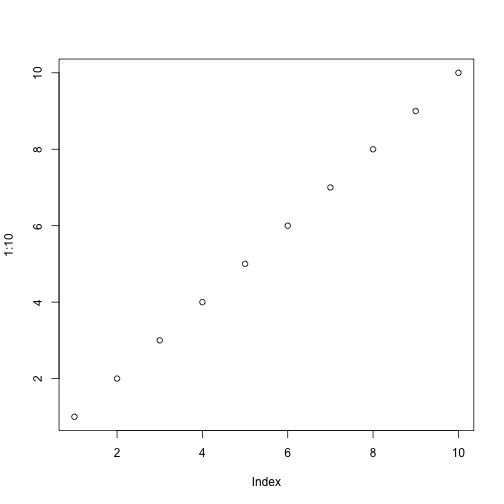
Plots:
plot(1:10)
Alternative knitr engines:
```{r}
# comment
this <- 10
is <- this + 10
good <- this + is
Also see vignette("rd-formatting").
Usage
markdown_evaluate(text)
Arguments
text |
Input text. |
Value
Text with R code expanded.
A character vector of the same length as the input text.
Roclet: make NAMESPACE
Description
This roclet automates the production of a NAMESPACE file, which controls
the functions imported and exported by your package, as described in
Writing R extensions.
It is run by default by roxygenize().
The NAMESPACE is generated in two passes: the first generates only
import directives (because this can be computed without evaluating package
code), and the second generates everything (after the package has been
loaded).
See vignette("namespace") for details.
Usage
namespace_roclet()
See Also
tags-namespace for tags that generate NAMESPACE directives.
Examples
# The most common namespace tag is @export, which declares that a function
# is part of the external interface of your package
#' @export
foofy <- function(x, y, z) {
}
# This results in the following line in `NAMESPACE`:
# export(foofy)

# You'll also often find global imports living in a file called
# R/{package}-package.R.
#' @importFrom magrittr %>%
#' @import rlang
NULL

# This results in the following lines in `NAMESPACE`:
# importFrom(magrittr,"%>%")
# import(rlang)
Check if documentation needs to be updated
Description
A lightweight check that compares modification times of .Rd files in
man/ with the source files listed in their backrefs. This is much faster
than running roxygenize() but can suffer from both false negatives (e.g.
if an inherited documentation topic has changed) and false positives (e.g.
if a source file was modified but the change doesn't affect the
documentation).
Usage
needs_roxygenize(package.dir = ".", quiet = FALSE)
Arguments
package.dir |
Location of package top level directory. Default is working directory. |
quiet |
If |
Value
A logical value, invisibly. TRUE if any man pages appear
to be out of date; FALSE otherwise.
Examples
## Not run:
needs_roxygenize()

## End(Not run)
Constructors for S3 object to represent R objects
Description
These objects are usually created by the parsers, but it is also useful to generate them by hand for testing.
Usage
object(value, alias, type)
Arguments
value |
The object itself. |
alias |
Alias for object being documented, in case you create a generator function with different name. |
type |
Type of the object, character. E.g. |
Default format for data
Description
This function is called to generate the default "Format" section for each data object. The default implementation will return the class and dimension information.
Usage
object_format(x)
Arguments
x |
A data object |
Value
A character value with valid Rd syntax, or NULL.
Parse a package, file, or inline code
Description
parse_package(), parse_file(), and parse_text() allow you to use
roxygen's parsing code to parse the roxygen blocks from a package, file, or
character vector of code. env_package() and env_file() provide
defaults that generate a temporary environment making it possible to
associate each block with the corresponding live object.
Usage
parse_package(path = ".", env = env_package(path))

parse_file(file, env = env_file(file), srcref_path = NULL)

parse_text(text, env = env_file(file))

env_file(file)

env_package(path)
Arguments
path, file, text |
Either specify a |
env |
An environment environment containing the result of evaluating the input code. The defaults will do this for you in a test environment: for real code you'll need to generate the environment yourself. You can also set to |
srcref_path |
Path to be used as source ref. |
Value
A list of roxy_block objects
See Also
Other extending:
load_options(),
rd_section(),
roc_proc_text(),
roclet_find(),
roxy_block(),
roxy_tag(),
roxy_tag_rd(),
tag_parsers,
tags_list()
Roclet: make Rd files
Description
This roclet automates the production of the .Rd files that
R uses to document functions, datasets, packages, classes, and more.
See vignette("rd-functions") for details.
It is run by default by roxygenize().
Usage
rd_roclet()
See Also
tags-rd-functions, tags-rd-datasets, tags-rd-S3, tags-rd-S4, tags-rd-S7, tags-rd-R6, tags-reuse, tags-index-crossref for tags provided by this roclet.
Examples
#' Add together two numbers
#' @param x A number.
#' @param y A number.
#' @return A number.
#' @export
#' @examples
#' add(1, 1)
#' add(10, 1)
add <- function(x, y) {
  x + y
}
Construct an rd_section object
Description
An rd_section represents an Rd command that can appear at the top-level
of an Rd document, like \name{}, \title{}, \description{}, or
\section{}.
Usage
rd_section(type, value)
Arguments
type |
Section type. Stored in |
value |
Section data. Only used by |
Methods
If provide your own rd_section type, you'll also need to define a
format.rd_section_{type} method that returns formatted Rd output. You
may also need to provide a merge.rd_section_{type} method if two
sections can not be combined with rd_section(x$type, c(x$value, y$value)).
See vignette("extending") for more details.
See Also
Other extending:
load_options(),
parse_package(),
roc_proc_text(),
roclet_find(),
roxy_block(),
roxy_tag(),
roxy_tag_rd(),
tag_parsers,
tags_list()
Process roclet on string and capture results
Description
Useful for testing.
Usage
roc_proc_text(roclet, input, wd = NULL)
Arguments
roclet |
Name of roclet to use for processing. |
input |
Source string |
wd |
Working directory |
See Also
Other extending:
load_options(),
parse_package(),
rd_section(),
roclet_find(),
roxy_block(),
roxy_tag(),
roxy_tag_rd(),
tag_parsers,
tags_list()
Build a new roclet
Description
Roclets are roxygen2's plugin system for producing different types of output,
like Rd files (rd_roclet()) or the NAMESPACE file (namespace_roclet()).
To create a new roclet, you will need to create a constructor function that
calls roclet(), and then implement the methods described below.
See vignette("extending") for more details.
Usage
roclet(subclass, ...)

roclet_preprocess(x, blocks, base_path)

roclet_process(x, blocks, env, base_path)

roclet_output(x, results, base_path, ...)

roclet_clean(x, base_path)

roclet_tags(x)
Arguments
subclass |
Class of the roclet, character vector. |
x |
A |
blocks |
A list of roxy_block objects. |
base_path |
Path to root of source package. |
env |
Package environment. |
results |
Value returned from your |
Methods
-
roclet_preprocess()is called after blocks have been parsed but before code has been evaluated. This should only be needed if your roclet affects how code will be evaluated. Should return a roclet. -
roclet_process()called after blocks have been evaluated; i.e. the@evaltag has been processed, and the object associated with each block has been determined. -
roclet_output()is given the output fromroclet_process()and should produce files on disk. -
roclet_clean()called whenroxygenise(clean = TRUE). Should remove any files created by the roclet.
Deprecated methods
roclet_tags() is no longer used; instead provide a roxy_tag_parse()
method for each tag.
Examples
# Custom roclet
custom_roclet <- roclet("custom")
# Roclet that extends the existing Rd roclet.
supercharged_rd_roclet <- roclet(c("cool", "rd"))
Create a roclet from a string
Description
This provides a flexible way of specifying a roclet in a string.
Usage
roclet_find(x)
Arguments
x |
Arbitrary R code evaluated in roxygen2 package. |
See Also
Other extending:
load_options(),
parse_package(),
rd_section(),
roc_proc_text(),
roxy_block(),
roxy_tag(),
roxy_tag_rd(),
tag_parsers,
tags_list()
Examples
# rd, namespace, and vignette work for backward compatibility
roclet_find("rd")

# But generally you should specify the name of a function that
# returns a roclet
roclet_find("rd_roclet")

# If it lives in another package, you'll need to use ::
roclet_find("roxygen2::rd_roclet")

# If it takes parameters (which no roclet does currently), you'll need
# to call the function
roclet_find("roxygen2::rd_roclet()")
Blocks
Description
A roxy_block represents a single roxygen2 block.
The block_* functions provide a few helpers for common operations:
-
block_has_tags(blocks, tags): doesblockcontain any of thesetags? -
block_get_tags(block, tags): get all instances oftags -
block_get_tag(block, tag): get single tag. ReturnsNULLif 0, throws warning if more than 1. -
block_get_tag_value(block, tag): getsvalfield from single tag.
Usage
roxy_block(tags, file, line, call, object = NULL)

block_has_tags(block, tags)

block_get_tags(block, tags)

block_get_tag(block, tag)

block_get_tag_value(block, tag)
Arguments
tags |
A list of roxy_tags. |
file, line |
Location of the |
call |
Expression associated with block. |
object |
Optionally, the object associated with the block, found
by inspecting/evaluating |
block |
A |
tag |
A single tag name. |
See Also
Other extending:
load_options(),
parse_package(),
rd_section(),
roc_proc_text(),
roclet_find(),
roxy_tag(),
roxy_tag_rd(),
tag_parsers,
tags_list()
Examples
# The easiest way to see the structure of a roxy_block is to create one
# using parse_text:
text <- "
  #' This is a title
  #'
  #' @param x,y A number
  #' @export
  f <- function(x, y) x + y
"

# parse_text() returns a list of blocks, so I extract the first
block <- parse_text(text)[[1]]
block
roxy_tag S3 constructor
Description
roxy_tag() is the constructor for tag objects.
roxy_tag_warning() is superseded by warn_roxy_tag(); use to generate a
warning that includes the location of the tag.
Usage
roxy_tag(tag, raw, val = NULL, file = NA_character_, line = NA_character_)

roxy_tag_parse(x)

roxy_tag_warning(x, ...)

warn_roxy_tag(tag, message, parent = NULL, envir = parent.frame())
Arguments
tag |
Tag name. Arguments starting with |
raw |
Raw tag value, a string. |
val |
Parsed tag value, typically a character vector, but sometimes
a list. Usually filled in by |
file, line |
Location of the tag |
x |
A tag |
... |
Additional data to be stored in the condition object.
If you supply condition fields, you should usually provide a
|
message |
Warning message |
parent |
Supply
For more information about error calls, see Including contextual information with error chains. |
envir |
passed to |
Methods
Define a method for roxy_tag_parse to support new tags. See tag_parsers
for more details.
See Also
Other extending:
load_options(),
parse_package(),
rd_section(),
roc_proc_text(),
roclet_find(),
roxy_block(),
roxy_tag_rd(),
tag_parsers,
tags_list()
Generate Rd output from a tag
Description
Provide a method for this generic if you want a tag to generate output
in .Rd files. See vignette("extending") for more details.
Usage
roxy_tag_rd(x, base_path, env)
Arguments
x |
The tag |
base_path |
Path to package root directory. |
env |
Environment in which to evaluate code (if needed) |
Value
Methods must return a rd_section.
See Also
Other extending:
load_options(),
parse_package(),
rd_section(),
roc_proc_text(),
roclet_find(),
roxy_block(),
roxy_tag(),
tag_parsers,
tags_list()
Document a package with roxygen2
Description
This is the workhorse function that builds manual pages and metadata for a
package. It is powered by roclets, roxygen2's plugin system for
producing different types of output. See the documentation of the
individual components (rd_roclet(), namespace_roclet(),
update_collate()) for more details, or learn how to make your own in
vignette("extending").
Usage
roxygenize(package.dir = ".", roclets = NULL, load_code = NULL, clean = FALSE)

roxygenise(package.dir = ".", roclets = NULL, load_code = NULL, clean = FALSE)
Arguments
package.dir |
Location of package top level directory. Default is working directory. |
roclets |
Character vector of roclets to use. The default, (Note that |
load_code |
A function used to load all the R code in the package
directory. The default, |
clean |
If |
Details
Note that roxygen2 is a dynamic documentation system: it works by inspecting loaded objects in the package. This means that you must be able to load the package in order to document it: see load for details.
Value
NULL
Parse tags
Description
These functions parse the raw tag value, convert a string into a richer R
object and storing it in val, or provide an informative warning and
returning NULL.
Usage
tag_value(x, multiline = "never")

tag_inherit(x)

tag_name(x)

tag_two_part(
  x,
  first,
  second,
  required = TRUE,
  markdown = TRUE,
  multiline = "never"
)

tag_name_description(x)

tag_words(x, min = 0, max = Inf, multiline = "never")

tag_words_line(x)

tag_toggle(x)

tag_code(x)

tag_examples(x)

tag_markdown(x)

tag_markdown_with_sections(x)
Arguments
x |
A roxy_tag object to parse |
multiline |
Controls how the tag may span multiple lines:
For backward compatibility, |
first, second |
Name of first and second parts of two part tags |
required |
Is the second part required (TRUE) or can it be blank (FALSE)? |
markdown |
Should the second part be parsed as markdown? |
min, max |
Minimum and maximum number of words |
Value
A roxy_tag object with the val field set to the parsed value.
New tag
To create a new @mytag define roxy_tag_parse.roxy_tag_mytag(). It should
either call one of the functions here, or directly set x$val.
See Also
Other extending:
load_options(),
parse_package(),
rd_section(),
roc_proc_text(),
roclet_find(),
roxy_block(),
roxy_tag(),
roxy_tag_rd(),
tags_list()
Tags for indexing and cross-references
Description
Learn the full details in vignette('index-crossref').
Key tags:
-
@aliases ${1:alias}: Add additional aliases to the topic. UseNULLto suppress the default alias automatically generated by roxygen2. -
@concept ${1:concept}: Add additional keywords or phrases to be included in thehelp.search()index. Each@conceptshould be a single term or phrase. -
@family ${1:family name}: Generate@seealsoentries to all other functions infamily name. -
@keywords ${1:keyword}: Add a standardised keyword, indexed byhelp.search(). These are generally not useful apart from@keywords internalwhich flags the topic as internal and removes from topic indexes. -
@references ${1:reference}: Pointers to the related literature. Usually formatted like a bibliography. -
@seealso [${1:func}()]: Link to other related functions or urls. Usually a sentence or two, or a bulleted list.
Other less frequently used tags:
-
@backref ${1:path}: Manually override the backreference that points from the.Rdfile back to the source.Rfile. Only needed when generating code.
Usage
#' @aliases ${1:alias}
#' @backref ${1:path}
#' @concept ${1:concept}
#' @family ${1:family name}
#' @keywords ${1:keyword}
#' @references ${1:reference}
#' @seealso [${1:func}()]
See Also
Other documentation tags:
tags-rd-R6,
tags-rd-S3,
tags-rd-S4,
tags-rd-S7,
tags-rd-datasets,
tags-rd-functions,
tags-reuse
Tags for managing the NAMESPACE
Description
Learn the full details in vignette('namespace').
Key tags:
-
@export: Export this function, method, generic, or class so it's available outside of the package. -
@exportS3Method ${1:package}::${2:generic}: Export an S3 method. Only needed when the method is for a generic from a suggested package. Use@exportS3Method NULLto suppress the missing export warning when it's a false positive, e.g. you're registering the method some other way. -
@importFrom ${1:package} ${2:function}: Import specific functions from a package. -
@useDynLib ${1:package}: Import compiled code from another package.
Other less frequently used tags:
-
@evalNamespace ${1:r-code}: Evaluate arbitrary code in the package namespace and insert the results into theNAMESPACE. Should return a character vector of directives. -
@exportClass ${1:class}: Export an S4 class. For expert use only; in most cases you should use@exportso roxygen2 can automatically generate the correct directive. -
@exportMethod ${1:generic}: Export S4 methods. For expert use only; in most cases you should use@exportso roxygen2 can automatically generate the correct directive. -
@exportPattern ${1:pattern}: Export all objects matching a regular expression. -
@import ${1:package}: Import all functions from a package. Use with extreme care. -
@importClassesFrom ${1:package} ${2:class}: Import S4 classes from another package. -
@importMethodsFrom ${1:package} ${2:generic}: Import S4 methods from a package. -
@rawNamespace ${1:namespace directives}: Insert literal text directly into theNAMESPACE.
Usage
#' @evalNamespace ${1:r-code}
#' @export
#' @exportClass ${1:class}
#' @exportMethod ${1:generic}
#' @exportPattern ${1:pattern}
#' @exportS3Method ${1:package}::${2:generic}
#' @import ${1:package}
#' @importClassesFrom ${1:package} ${2:class}
#' @importFrom ${1:package} ${2:function}
#' @importMethodsFrom ${1:package} ${2:generic}
#' @rawNamespace ${1:namespace directives}
#' @useDynLib ${1:package}
Tags for documenting R6
Description
Learn the full details in vignette('rd-R6').
Key tags:
-
@field ${1:name} ${2:description}: Describe a R6 or refClass field. -
@R6method ${1:Class}$${2:method}: Document an R6 method that can't be discovered by introspection, such as methods added via$set().
Usage
#' @field ${1:name} ${2:description}
#' @R6method ${1:Class}$${2:method}
See Also
Other documentation tags:
tags-index-crossref,
tags-rd-S3,
tags-rd-S4,
tags-rd-S7,
tags-rd-datasets,
tags-rd-functions,
tags-reuse
Tags for documenting S3
Description
Learn the full details in vignette('rd-S3').
Key tags:
-
@method ${1:generic} ${2:class}: If ambiguous, clarify which generic an S3 method belongs too. Only needed in very rare cases.
Usage
#' @method ${1:generic} ${2:class}
See Also
Other documentation tags:
tags-index-crossref,
tags-rd-R6,
tags-rd-S4,
tags-rd-S7,
tags-rd-datasets,
tags-rd-functions,
tags-reuse
Tags for documenting S4
Description
Learn the full details in vignette('rd-S4').
Key tags:
-
@slot ${1:name} ${2:description}: Describe the slot of an S4 class.
Usage
#' @slot ${1:name} ${2:description}
See Also
Other documentation tags:
tags-index-crossref,
tags-rd-R6,
tags-rd-S3,
tags-rd-S7,
tags-rd-datasets,
tags-rd-functions,
tags-reuse
Tags for documenting S7
Description
Learn the full details in vignette('rd-S7').
Key tags:
-
@prop ${1:name} ${2:description}: Describe an S7 class property that is not a constructor parameter.
Usage
#' @prop ${1:name} ${2:description}
See Also
Other documentation tags:
tags-index-crossref,
tags-rd-R6,
tags-rd-S3,
tags-rd-S4,
tags-rd-datasets,
tags-rd-functions,
tags-reuse
Tags for documenting datasets
Description
Learn the full details in vignette('rd-datasets').
Key tags:
-
@format ${1:description}: Describe the type/shape of a dataset. If the dataset is a data frame, include a description of each column. If not supplied, will be automatically generated byobject_format(). -
@source ${1:description}: Describe where the dataset came from. Provide a link to the original source (if possible) and briefly describe any manipulation that you performed when importing the data.
Usage
#' @format ${1:description}
#' @source ${1:description}
See Also
Other documentation tags:
tags-index-crossref,
tags-rd-R6,
tags-rd-S3,
tags-rd-S4,
tags-rd-S7,
tags-rd-functions,
tags-reuse
Tags related to markdown support
Description
Learn the full details in vignette('rd-formatting').
Other less frequently used tags:
-
@md: Force markdown processing for a block. -
@noMd: Suppress markdown processing for a block. -
@section ${1:section title}: : Add an arbitrary section to the documentation. Now generally superseded in favour of using a level 1 heading.
Usage
#' @md
#' @noMd
#' @section ${1:section title}:
Tags for documenting functions
Description
Learn the full details in vignette('rd-functions').
Key tags:
-
@description${1:A short description...} : A short description of the purpose of the function. Usually around a paragraph, but can be longer if needed. -
@example ${1:path}.R: Embed examples stored in another file. -
@examples${1:# example code} : Executable R code that demonstrates how the function works. Code must run without error. -
@examplesIf ${1:condition}${2:# example code} : Run examples only whenconditionisTRUE. -
@noRd: Suppress.Rdgeneration for a block. Use for documentation blocks that should only be visible in the source code. -
@param ${1:name} ${2:description}: Describe a function input. Should describe acceptable input types and how it affects the output.descriptionis usually one or two sentences but can be as long as needed. Document multiple arguments by separating their names with commas without spaces. -
@returns ${1:description}: Describe the function's output. Typically will be a 1-2 sentence description of the output type, but might also include discussion of important errors or warnings. -
@title ${1:title}: A one-line description of the function shown in various indexes. An explicit@titleis not usually needed as by default it is taken from the first paragraph in the roxygen block. -
@usage ${1:fun}(${2:arg1, arg2 = default, ...}): Override the default usage generated by roxygen2. Only needed when roxygen2 fails to correctly derive the usage of your function.
Other less frequently used tags:
-
@details${1:Additional details...} : Additional details about the function. Generally superseded by instead using a level 1 heading. -
@rawRd ${1:rd}: Insert literal text directly into the.Rdfile. -
@return ${1:description}: Describe the function's output. Superseded in favour of@returns.
Usage
#' @description${1:A short description...}

#' @details${1:Additional details...}

#' @example ${1:path}.R
#' @examples${1:# example code}

#' @examplesIf ${1:condition}${2:# example code}

#' @noRd
#' @param ${1:name} ${2:description}
#' @rawRd ${1:rd}
#' @return ${1:description}
#' @returns ${1:description}
#' @title ${1:title}
#' @usage ${1:fun}(${2:arg1, arg2 = default, ...})
See Also
Other documentation tags:
tags-index-crossref,
tags-rd-R6,
tags-rd-S3,
tags-rd-S4,
tags-rd-S7,
tags-rd-datasets,
tags-reuse
Tags that help you reuse documentation
Description
Learn the full details in vignette('reuse').
Key tags:
-
@describeIn ${1:destination} ${2:description}: Document a function or method in thedestinationtopic. -
@inherit ${1:source} ${2:components}: Inherit one or more documentation components from another topic. Ifcomponentsis omitted, all supported components will be inherited. Otherwise, specify individual components to inherit by picking one or more ofparams,return,title,description,details,seealso,sections,references,examples,author,source,note, andformat. -
@inheritDotParams ${1:source} ${2:arg1 arg2 arg3}: Automatically generate documentation for...when you're passing dots along to another function. We recommend supplying explicit argument names for maximum clarity and consistency. -
@inheritParams ${1:source} ${2:arg1 arg2 arg3}: Inherit argument documentation from another function. Only inherits documentation for arguments that aren't already documented locally. Optionally followed by a list of argument names to include or exclude, using the same syntax as@inheritDotParams. -
@inheritSection ${1:source} ${2:section name}: Inherit a specific named section from another topic. -
@order ${1:number}: Override the default (lexigraphic) order in which multiple blocks are combined into a single topic. -
@rdname ${1:topic-name}: Override the file name of generated.Rdfile. Can be used to combine multiple blocks into a single documentation topic.
Other less frequently used tags:
-
@eval ${1:r-code}: Evaluate arbitrary code in the package namespace and insert the results back into the block. Should return a character vector of lines. -
@evalRd ${1:r-code}: Evaluate arbitrary code in the package namespace and insert the results back as into the block. Should return a character vector of lines. -
@includeRmd man/rmd/${1:filename}.Rmd: Insert the contents of an.Rmdinto the current block. Superseded in favour of using a code chunk with a child document. -
@template ${1:path-to-template}: Use a roxygen2 template. Now superseded in favour of inline R code. -
@templateVar ${1:name} ${2:value}: Define variables for use in a roxygen2 template.
Usage
#' @describeIn ${1:destination} ${2:description}
#' @eval ${1:r-code}
#' @evalRd ${1:r-code}
#' @includeRmd man/rmd/${1:filename}.Rmd
#' @inherit ${1:source} ${2:components}
#' @inheritDotParams ${1:source} ${2:arg1 arg2 arg3}
#' @inheritParams ${1:source} ${2:arg1 arg2 arg3}
#' @inheritSection ${1:source} ${2:section name}
#' @order ${1:number}
#' @rdname ${1:topic-name}
#' @template ${1:path-to-template}
#' @templateVar ${1:name} ${2:value}
See Also
Other documentation tags:
tags-index-crossref,
tags-rd-R6,
tags-rd-S3,
tags-rd-S4,
tags-rd-S7,
tags-rd-datasets,
tags-rd-functions
Access metadata about built-in or available tags
Description
Access metadata about built-in or available tags
Usage
tags_list(built_in = TRUE)

tags_metadata()
Arguments
built_in |
Logical. Whether to restrict the result to built-in tags
( |
See Also
Other extending:
load_options(),
parse_package(),
rd_section(),
roc_proc_text(),
roclet_find(),
roxy_block(),
roxy_tag(),
roxy_tag_rd(),
tag_parsers
Update Collate field in DESCRIPTION
Description
By default, R loads files in alphabetical order. This is fine if your
package doesn't have any cross-file dependencies, but if you're using a tool
like S4, you'll need to make sure that classes are loaded before subclasses
and generics are defined before methods. You can do this by hand by setting
the Collate field in the DESCRIPTION or automate it by using @include
tags to specify the cross-file dependencies:
#' @include before.R
NULL
If there are no @include tags, roxygen2 will leave the Collate field as
is. This makes it easier to use roxygen2 with an existing collate directive,
but if you remove all your @include tags, you'll need to also
manually delete the collate field.
Generally, you should not need to run this function yourself; it will be run automatically by any package that needs to load your R files in collation order.
update_collate() is not not technically a roclet, like rd_roclet()
and namespace_roclet(), because you have to be able to load the package
before you can process it with roclets. However, because it was historical
implemented as a roclet, it's still controlled by the roclets argument of
roxygenize().
Usage
update_collate(base_path)
Arguments
base_path |
Path to package directory. |
Examples
#' If `example-a.R`, `example-b.R` and `example-c.R` live in `R/`
#' and we're in `example-a.R`, then the following @include tag
#' ensures that example-b and example-c are sourced before example-a.
#' @include example-b.R example-c.R
NULL
Re-build outdated vignettes
Description
This roclet rebuilds outdated vignettes with tools::buildVignette, but we no longer recommend it because we no longer recommend storing built vignettes in a package.
By default, it will rebuild all vignettes if the source file is newer than
the output pdf or html. (This means it will automatically re-build the
vignette if you change the vignette source, but not when you
change the R code). If you want finer control, add a Makefile to
vignettes/ and roxygen2 will use that instead.
To prevent RStudio from re-building the vignettes again when checking
your package, add --no-build-vignettes to the "Build Source Package"
field in your project options.
Usage
vignette_roclet()